Online Check-In
What is a Multiple City booking?
With Multiple City bookings, you can visit multiple destinations in one booking, whether you’re travelling for business, leisure, or both, all managed under one reservation.
How can I book a Multiple City itinerary with Royal Brunei?
You can book a Multiple City trip directly through our website by selecting the “Multiple City” option on the booking form. This feature enables you to add up to six flight segments, accommodating complex travel plans.
How do I book with Royal Brunei using Multiple City?
You may follow the steps listed below to successfully book with Royal Brunei using Multiple City.
Step 1: Select Multiple City on the booking form. Check that the ‘Multiple City’ tab is selected.
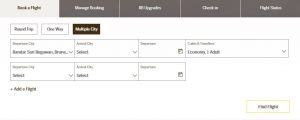
Step 2: Select your destinations.
Simply enter your departure city, add your preferred stopovers, and choose your final destination.
Step 3: Select your travel dates.
Pick your travel dates for each part of your trip, choose how many are flying and preferred travel class, then hit ‘Find Flight’ to explore your flight options.
Tip: Check our Flight Timetable first as this will help you select the correct days of departure on the booking form when using Multiple City.
Step 4: Select your flights and confirm.
Just select your flights and complete the steps. Your whole trip will be booked in one go.